What is engagement and how is it calculated?
Engagement shows how much people interact with your content compared to its reach or visibility. This article explains what it means in social media analytics and how the platform calculates it.
What is engagement?
Engagement generally refers to how involved or interested people are in something. It could be an activity, a conversation, or an online post. In short, engagement is about participation, involvement, and interest.
On social media, engagement refers to the level at which an audience interacts with the content a brand or person shares. This can include likes, shares, comments, link clicks, survey responses, or other actions that show active interest in the content.
How is it calculated?
You can set the formula used to calculate post engagement in brand settings. You can also save the change for all brands.
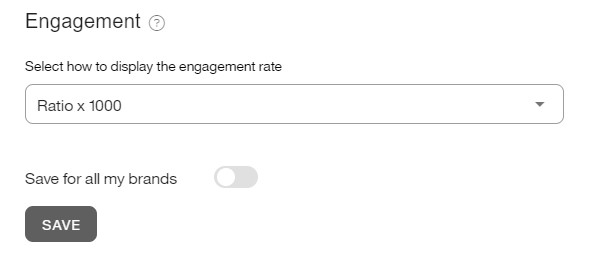
You can choose between two options:
Ratio x 100: the formula uses interactions received per 100 people reached.
Ratio x1000: the formula uses interactions received per 1000 people reached.
For X and LinkedIn, impressions are used instead of reach.
Previously, engagement was displayed as a ratio over 1000. Now it is calculated with x100 by default.
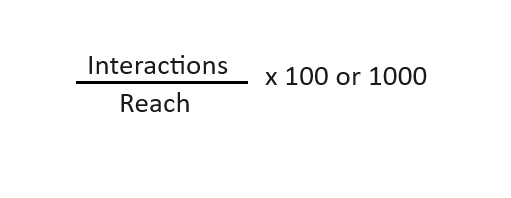
Depending on the social network, the formula can vary slightly.
For Instagram, engagement is always calculated using organic data. Even if you connect your Meta Ads account to get promoted post data, that information does not affect the engagement calculation. The result is based only on organic interactions, such as likes, comments, and saves, in relation to the organic reach of your posts.
Analyzing your engagement
Engagement is based on the relationship between interactions and reach.
A post with 50 interactions and a reach of 100 people has higher engagement than a post with 1,000 interactions and a reach of 10,000 people. In the first case, the level of involvement is higher even though it reached fewer people.
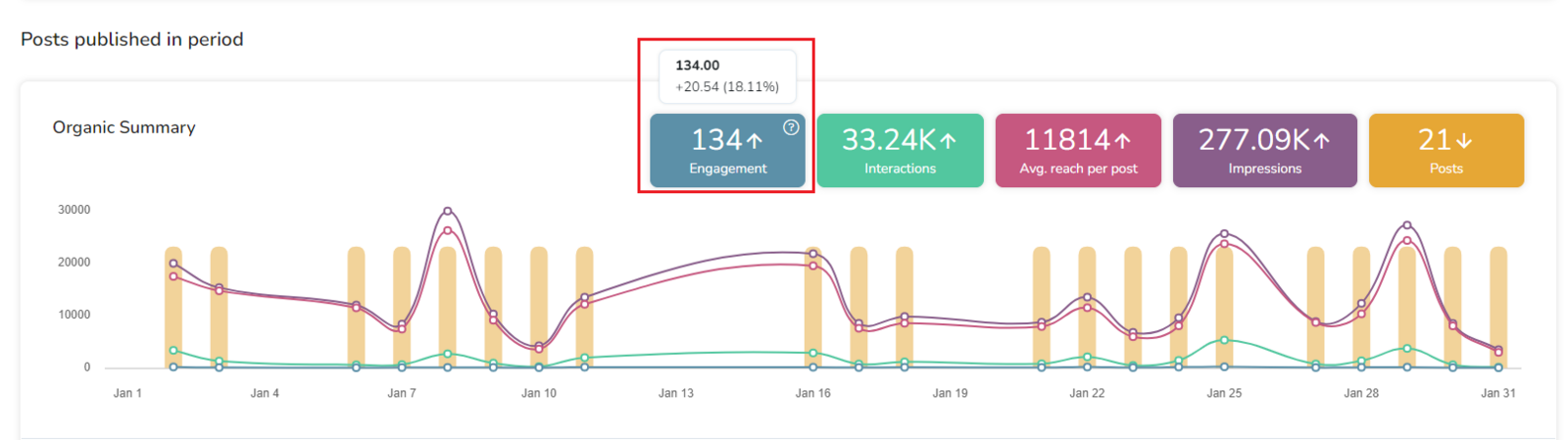
In the platform, you can track how engagement changes compared to the previous equivalent period. In the screenshot, the engagement result is 134 out of 1000, which is 20.54 points higher than the previous 31 days.
If you want to apply the engagement formula manually, first calculate total reach by multiplying the average reach per post by the number of posts.
💡 We recommend applying the x1000 ratio for accounts with a larger number of followers, as it provides more detail, and adding competitors for a reference point in your industry.
Competitors engagement
Engagement for competitors is calculated differently from engagement for your own account, so we recommend adding your own account as a competitor to make the data comparable.
The formula is: Average interactions / number of followers x 100 or x 1000, depending on the formula you selected.
Unlike your own account, this calculation uses average interactions and number of followers. Reach is not used because it is not public for competitors.