What is an RSS Feed and how does it work
An RSS Feed is a list of the latest content published on a website. This article explains how to find it, how it works, and where you can use it in the platform.
What is an RSS Feed
An RSS Feed is a list of the latest content published on a website, such as blog articles. This feed is generated in a standard format called XML, which allows tools like the platform to read it and detect new content.
How to get an RSS Feed
Each blog or website usually has its own RSS Feed. Depending on the platform, this feed is generated automatically or can be configured.
Here are the most common ways to find the RSS Feed of your blog:
Add
/feedat the end of the blog URL. Example:https://yourblog.com/feedAdd
/rssat the end of the URL. Example:https://yourblog.com/rssCheck your platform's documentation, such as WordPress, Blogger, or Wix.
Inspect the page source. In many blogs you will find a line like this:
<link rel="alternate" type="application/rss+xml" href="https://yourblog.com/feed" />Specific settings in WordPress
If your blog is built with WordPress, the RSS feed shows the latest 10 posts by default.
To change the number of posts included in the feed:
Go to Settings.
Go to Reading.
In Syndication feeds show the most recent, set the number of posts you want in the RSS feed.
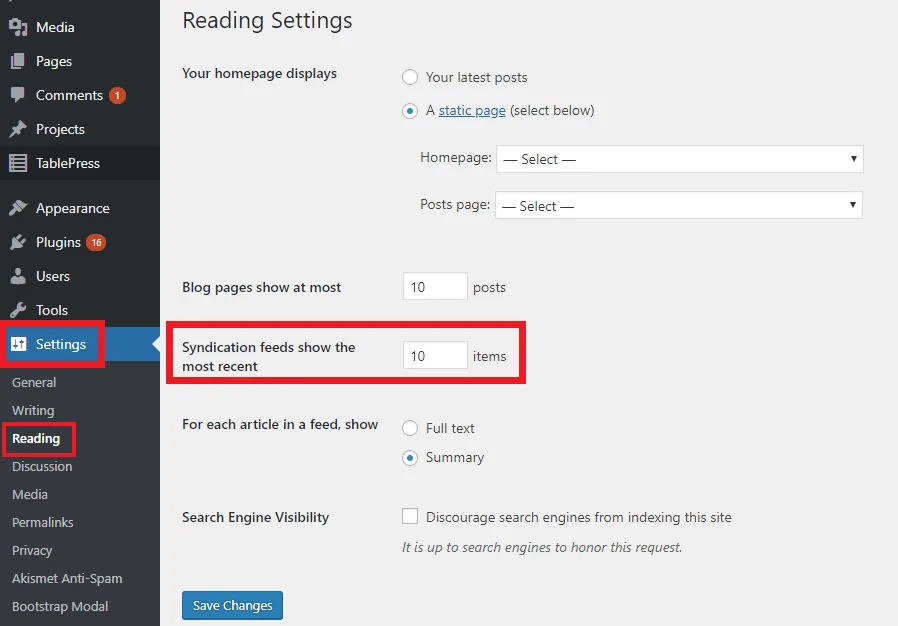
If you cannot find the RSS feed, contact your blog platform provider or web developer. The platform can only work with a valid XML RSS feed.
Uses of the RSS Feed
You can use an RSS Feed in two main ways:
When connecting your website: When you connect your website or blog, you can add its RSS feed. This lets the platform read your latest articles automatically and display them in your panel.
In an autolist: You can create an autolist from an RSS feed to automate article publishing on social networks. This system is designed for blogs. It is not fully compatible with other feed types, such as YouTube or Instagram, which use different structures.
If you want to learn how to create an autolist with an RSS Feed, see How to link an RSS Feed.
How the RSS Feed works
When you connect an RSS Feed, the process works like this:
The platform reads each item in the feed.
It extracts the content URL from the
<link>field.It visits that URL, which is the actual article page.
It checks whether that page includes a main image through the
og:imagetag.If it finds an image, it uses it for the social post. If not, it tries to use the first available image on the page.
The og:image tag is not inside the RSS feed. It is part of each article page.
Limitations to keep in mind
If the page does not include the
og:imagetag, no image will be published.Feeds from platforms such as YouTube or Instagram may work differently:
YouTube: the platform can read the URL and image, but it publishes an image and a link, not the video.
Instagram: image URLs may expire because they are temporary.
Frequently asked questions
Can I use any RSS Feed?
The system is designed for blog feeds that follow the XML standard. Feeds from other platforms, such as YouTube, Instagram, or custom sources, may not be compatible.
Why does the RSS only show the last 10 articles?
That is the default setting in many blog platforms, including WordPress. You can change it in the platform settings. In WordPress, use Syndication feeds show the most recent in the Reading settings.
Does the RSS Feed sync automatically?
Yes. If you use an RSS-based autolist, the platform checks the feed regularly to detect new articles and publish them according to your setup.
What happens if my page does not have og:image?
If the page does not include the og:image tag, the system cannot find a specific image for the post. It will try to use the first available image on the page instead.
Why don’t I see the image in the autolist?
Images are only downloaded for Instagram and Pinterest. On other networks, the preview is generated by the network itself.
Does it work with YouTube?
Yes, but it publishes an image and a link, not the video.
Does it work with Instagram?
It can work, but image URLs are temporary and may expire.